
Have You Ever Had Something Strange Happen With Your Business Email?
Maybe you’ve received an email from yourself.
A customer called asking about an email you never sent.
Someone on your team mentioned an invoice with different payment instructions than usual.
Or maybe an employee said, “This email just doesn’t seem right.”
Most business owners brush these situations off as technology glitches or honest mistakes.
Sometimes they are…
Sometimes they’re the first warning sign that someone is trying to compromise your business.
Email has become one of the most important tools your company relies on every day. It’s how you communicate with customers, send invoices, approve purchases, exchange contracts, and keep your business moving.
That’s exactly why cybercriminals target it.
They don’t always need to hack your entire network. If they can gain access to, or successfully imitate, a trusted email account, they may be able to convince someone to send money, share confidential information, or provide access to other systems.
The good news is that many email attacks leave clues before they become major problems.
Knowing what to look for can help you catch suspicious activity early and reduce the risk of financial loss or data exposure.
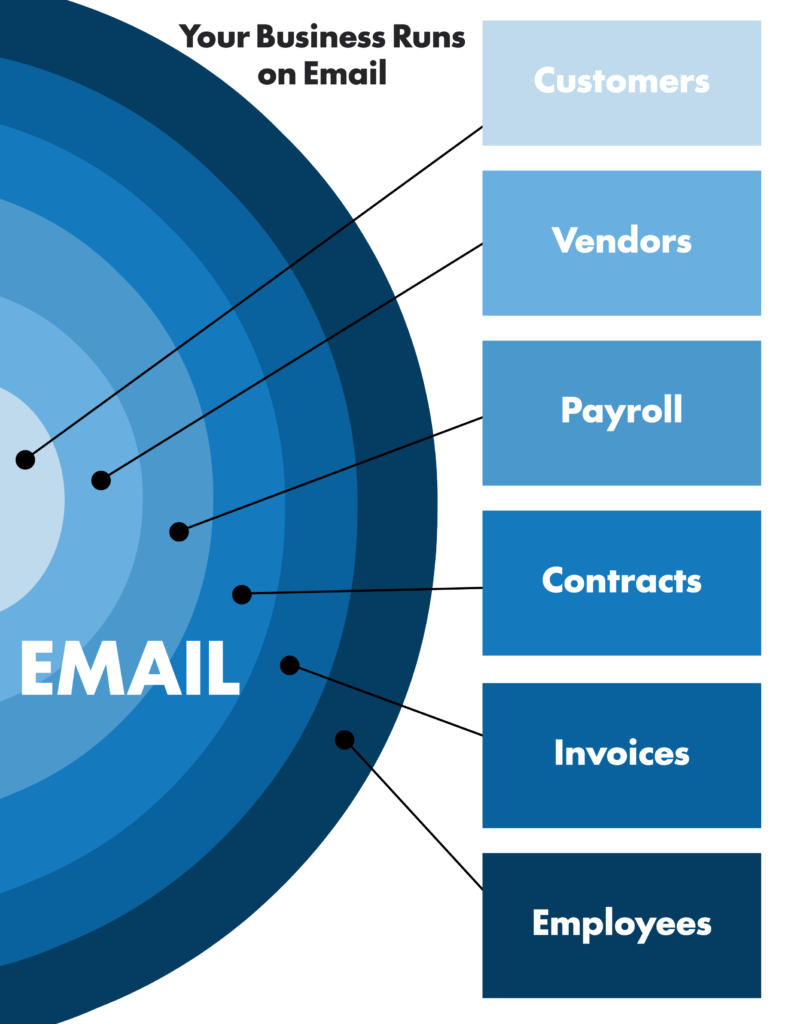
If your email is compromised, every part of your business can be affected.
What is Business Email Compromise?
Business Email Compromise (often called BEC) is a type of cyberattack where criminals use email to trick employees into taking an action they normally wouldn’t.
Unlike traditional phishing attacks that are sent to thousands of people at once, these attacks are often highly targeted.
The attacker may pretend to be:
- Your CEO
- A manager
- A customer
- A vendor
- Your accountant
- Your attorney
Their goal is simple.
To convince someone they trust the email enough to:
- Send money
- Change payment information
- Share confidential documents
- Reveal usernames and passwords
- Provide access to company systems
These attacks don’t always involve dramatic computer hacks. In many cases, they succeed simply because the email looks legitimate.
7 Warning Signs Your Business Email May Be Compromised
1. You Receive Emails From Yourself
A common call IT providers receive starts with:
“I just got an email from my own email address.”
While this doesn’t always mean your account has been hacked, it should never be ignored.
Sometimes hackers “spoof” your email address, making it appear as though the message came from you when it actually didn’t.
Other times, it may indicate that someone has gained access to your account.
Either way, it’s worth having your email security reviewed before assuming it’s harmless.
2. Customers Say You Sent an Email You Never Sent
Imagine getting a phone call from a customer asking about an invoice or message you know you never emailed.
That should immediately raise questions.
Cybercriminals sometimes impersonate businesses to trick customers into sending payments to fraudulent bank accounts or clicking malicious links.
The sooner these situations are investigated, the better the chances of preventing financial loss and protecting your reputation.
3. Employees Notice Strange Login Activity
Have you ever received an unexpected Multi-Factor Authentication prompt?
Or had an employee say they were suddenly signed out of Microsoft 365?
Maybe someone noticed login alerts from another location.
These events don’t always mean an account has been compromised, but they often indicate that someone is attempting to gain access.
Ignoring repeated login attempts can give attackers more opportunities to succeed.
Not Every Warning Sign Looks Like a Cyberattack
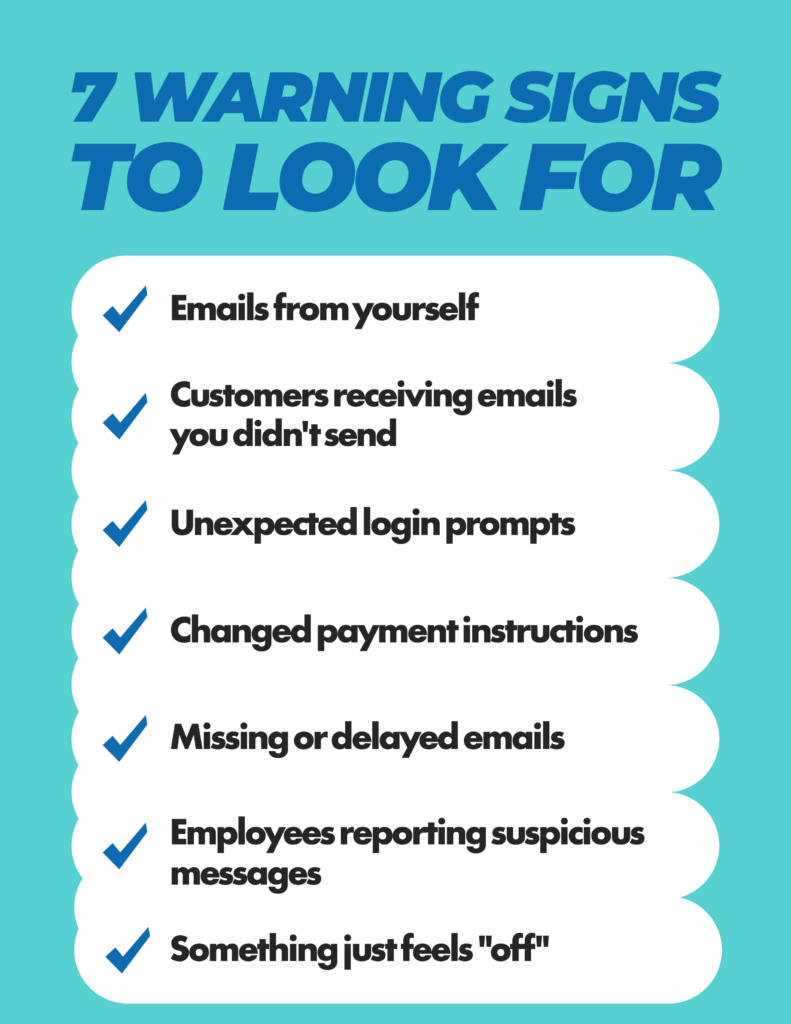
- You receive emails from yourself
- Customers receive emails you never sent
- Unexpected login prompts appear
- Payment information suddenly changes
- Emails arrive at unusual times
- Employees report suspicious messages
- Something just feels “off”
One warning sign may not mean your business has been compromised. Multiple warning signs deserve attention.
4. Payment Instructions Suddenly Change
One of the most expensive forms of Business Email Compromise involves payment fraud.
An employee receives what appears to be a legitimate email asking them to update banking information for a vendor or customer.
The request often looks completely normal.
The logo is correct.
The signature looks familiar.
The conversation may even continue within an existing email thread.
The only difference is where the money is being sent.
Before changing payment information, always verify the request using a known phone number or another trusted method of communication.
5. Emails Suddenly Arrive Late or Go Missing
Have you ever waited hours for an important email that was supposedly sent earlier?
Have customers told you they replied, but you never received the message?
While delayed email isn’t always caused by cybercriminals, unexplained delivery problems can sometimes point to email configuration issues or compromised accounts.
If these issues become frequent, they’re worth investigating rather than dismissing as technical glitches.
6. Employees Keep Reporting Suspicious Emails
Your employees are often the first line of defense.
If several people begin asking questions like:
- “Is this email real?”
- “Did you send me this?”
- “This just doesn’t look right.”
… pay attention.
In many cases, employees recognize that something feels different before anyone realizes an attack is underway.
Encourage your team to report suspicious emails instead of ignoring them. It’s always better to investigate a legitimate email than to overlook a malicious one.
Creating a culture where employees feel comfortable asking questions can prevent costly mistakes.
7. Something Just Doesn’t Feel Right
Sometimes there isn’t one obvious warning sign.
Instead, it’s a collection of little things.
A vendor’s writing style suddenly changes. An email creates unnecessary urgency.
A customer asks you to send payment somewhere new.
An executive requests something they’ve never requested before.
None of these situations automatically mean your business has been compromised, but they should slow you down.
Cybercriminals rely on people acting quickly without verifying the request.
Trust your instincts. If something feels unusual, verify it before taking action.
Why These Attacks Work So Well
One of the biggest misconceptions about cybersecurity is that successful attacks happen because someone isn’t paying attention.
In reality, Business Email Compromise attacks are successful because they are designed to look legitimate.
Attackers study businesses before they act.
They learn:
- Who approves payments
- Who handles payroll
- Which vendors you work with
- How employees communicate
- When invoices are typically sent
By the time they send an email, it often looks like part of a normal business conversation.
They’re not trying to fool your antivirus software.
They are trying to fool your employees.
That’s why technology alone isn’t enough.
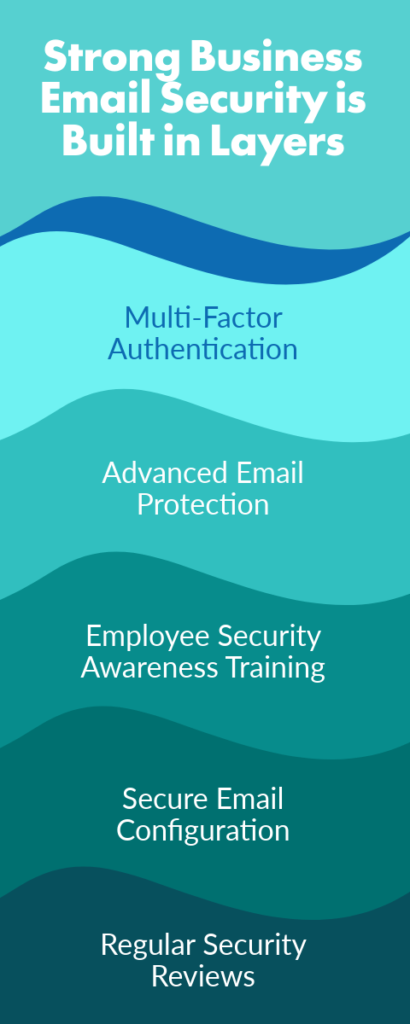
Protecting your business email requires a combination of security tools, employee awareness, and good verification procedures.
How to Better Protect Your Business Email
While no security solution can eliminate every threat, there are several practical steps every business should take to reduce the risk.
Enable Multi-Factor Authentication
Passwords can be stolen.
Multi-factor authentication adds another layer of protection by requiring a second form of verification before someone can access an account.
Keep Microsoft 365 and Other Email Platforms Properly Secured
Many businesses assume that simply using Microsoft 365 means their email is fully protected.
Microsoft provides an excellent platform, but it doesn’t automatically include every layer of protection your business may need.
Security settings should be reviewed regularly to ensure they match your organization’s needs.
Train Employees Regularly
Technology catches many threats.
Employees catch many others.
Regular cybersecurity awareness training helps your team recognize suspicious emails, report concerns quickly, and avoid common scams before they become incidents.
Verify Financial Requests
Whenever payment information changes or someone requests a wire transfer, verify the request using a trusted phone number or another independent method of communication.
A thirty-second phone call can prevent a costly mistake.
Review Your Email Security Regularly
Cyber threats continue to evolve.
The protections that worked a few years ago may not be enough today.
Regular security reviews help identify gaps before attackers do.
Questions to Ask Your Provider
Whether you work with an internal IT department or a managed IT provider, these questions can help you better understand how your business email is being protected.
- How is our business email protected beyond basic spam filtering?
- Is Multi-Factor Authentication enabled for every employee?
- How are suspicious emails monitored and investigated?
- Do you provide cybersecurity awareness training for employees?
- When was our email security last reviewed?
If you’re unsure how any of these questions would be answered, it may be time to schedule a conversation.
Making Sure Your Business Is Protected Is A Business Decision
Business Email Compromise doesn’t usually begin with flashing warning messages or locked computers.
More often, it begins with a single email that looks completely ordinary.
Like a changed payment request, a login notification, a customer asking about an email you never sent, or simply a message that doesn’t feel quite right.
Recognizing these warning signs early gives your business the opportunity to investigate before a small issue becomes a much larger one.
Email is one of the most important tools your business depends on every day.
Making sure it’s properly protected isn’t just an IT issue.
It’s a business decision.
Business Email Compromise often begins with small warning signs that are easy to dismiss. Learn seven signs your business shouldn’t ignore and practical ways to better protect your email.
Not Sure If Your Business Email Is Properly Protected?
If you’ve experienced one or more of these warning signs, it doesn’t necessarily mean your business has been compromised. But it does mean it’s worth taking a closer look.
At intelliSystems, we help businesses throughout Georgia and South Carolina evaluate their IT and cybersecurity to identify risks before they become costly problems. Our Cyber Defense Assurance Audit (CDAA) reviews your current environment, including your email security, and provides clear, practical recommendations to help strengthen your defenses.
Schedule a conversation with our team to learn whether your current email security is providing the protection your business needs.
Frequently Asked Questions
Can someone send an email that looks like it came from me?
Yes. Cybercriminals can “spoof” an email address, making it appear as though a message came from you even if they don’t have access to your account. That’s why receiving an email from your own address should always be investigated.
Does Microsoft 365 fully protect my business email?
Microsoft 365 includes important security features, but those features still need to be properly configured and managed. Many businesses benefit from additional layers of protection, ongoing monitoring, and employee cybersecurity training.
What should I do if I think my email has been compromised?
Contact your IT provider as soon as possible. They can determine whether your account has been accessed, review recent login activity, check for suspicious forwarding rules, and recommend the appropriate next steps.
How can employees help prevent email attacks?
Employees play a critical role in business email security. Encouraging them to question unexpected requests, verify payment changes, and report suspicious emails can prevent many attacks before they succeed.
Can small businesses really become targets?
Absolutely. Businesses of every size rely on email to communicate, exchange sensitive information, and process payments. That makes small and midsize businesses attractive for cybercriminals, especially if they have limited cybersecurity protections in place.